 Author: Laura Bulmer
Mobile working is no longer a “nice to have”. Whether your team is approving invoices between meetings, accessing customer records on-site, or managing workflows remotely, employees now expect fast, intuitive access to business systems from anywhere.
That’s exactly what the new DocuWare mobile app has been designed to deliver.
According to DocuWare’s latest product announcement, the newly rebuilt app focuses on streamlined mobile workflows, faster task handling, and a significantly improved user experience for cloud customers.
The previous mobile app served its purpose, but mobile usage expectations have changed dramatically over the last few years. Users now expect:
The new app has been rebuilt with a mobile-first approach, focusing specifically on “on-the-go” business processes.
This aligns with wider developments across the DocuWare platform, including accessibility improvements, AI-driven enhancements, and a refreshed user interface planned throughout 2026.
Users can quickly search, retrieve, and share documents directly from their mobile device. This is especially useful for:
Instead of waiting to get back to a desktop, teams can securely access information immediately.
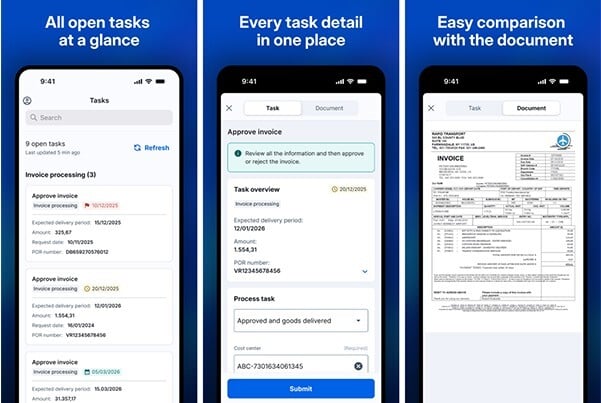
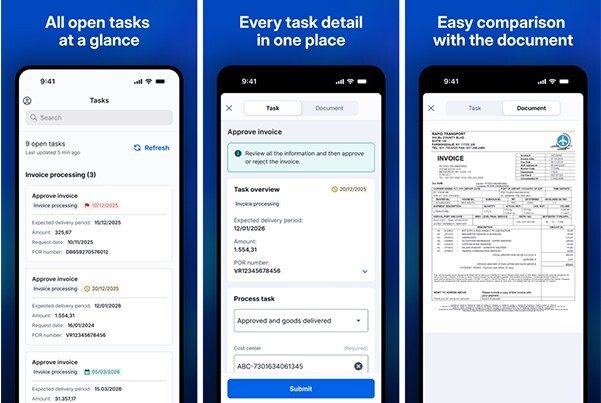
One of the biggest improvements is the redesigned workflow task experience.
The app now organises assigned tasks by workflow, making it much easier to:
This creates a far cleaner mobile experience compared to traditional document management interfaces.
With DocuWare support, users can now receive real-time push notifications for workflow tasks.
This helps businesses reduce delays by ensuring approvals and actions are seen immediately rather than waiting for users to manually check the system.
For organisations running approval-heavy processes such as invoice processing, HR onboarding, or compliance workflows, this can significantly improve turnaround times.
The new app also allows users to import files directly from other mobile applications into DocuWare.
That means employees can:
This reduces the risk of documents being lost or stored outside controlled systems.
The updated interface uses streamlined tab-based navigation, allowing users to move between workflow tasks and related documents without losing context.
In practice, this means fewer clicks, faster approvals, and a more natural mobile experience.
The previous app has now been renamed DocuWare Classic.
While it will remain available in app stores for now, DocuWare has confirmed that it will no longer receive active development or long-term maintenance.
Importantly, future operating system updates, particularly iOS updates, could eventually create compatibility issues for the legacy app.
For this reason, cloud customers should begin planning migration to the new mobile experience where appropriate.
The new app is currently available for:
Support for on-premise systems (version 7.9 and above) is expected later in 2026.
The new mobile app represents more than just a cosmetic refresh.
It reflects a broader shift in document management towards:
For businesses already using DocuWare, the updated app provides a much more modern way for users to interact with workflows away from their desks.
And for organisations considering digital transformation projects, it highlights how document management platforms are continuing to evolve beyond simple document storage into fully connected business process tools.
If you'd like to discuss how mobile workflow automation could support your organisation, the team at DocTech can help you explore the latest capabilities available within DocuWare. Contact us: 0161 647 7040 info@doctech.co.uk

 info@doctech.co.uk
 0161 647 7040