.png)
 Author: Laura Bulmer
This blog will aim to answer all of the commonly asked questions we think clients have when looking at document workflow software.
Document workflow is digital tool used to design the journeys for routing documents through your organisation. These pre-designed workflows contain unlimited permeations to your exacting requirements and are commonly used to control document journeys for receipt, approval and storage.
These workflows help organisations to ensure uniformity of process and transparency, whilst reducing the risks and inefficiency of manual document routing.
.png?width=500&height=308&name=AP%20Automation%20%20(3).png) Document workflows are part of an overall document management system such as DocuWare.
Document workflows are part of an overall document management system such as DocuWare.
The workflow element is the process of managing how documents move through your organisation, from creation or receipt through to review, approval and secure storage.
A digital document workflow replaces manual processes such as email chains, paper forms and spreadsheet tracking with automated processes that ensure documents are routed to the right people at the right time. This improves efficiency, reduces delays and provides greater visibility over every stage of a process.
Document workflow automation uses software to manage repetitive document-based tasks automatically. Instead of employees manually forwarding documents, requesting approvals or checking progress, automated workflows use predefined rules to move documents through each stage of a process.
For example, an invoice workflow can automatically capture a supplier invoice, send it to the correct approver, record approval decisions and securely archive the completed document.
.png?width=500&height=308&name=strath%20quote%20%26%20image%20%20(1).png) Automating document workflows helps organisations save time, improve accuracy and gain better control over business processes.
Automating document workflows helps organisations save time, improve accuracy and gain better control over business processes.
Key benefits include:
By removing unnecessary manual steps, employees can focus on more valuable tasks while routine processes continue automatically.
Almost any document-based process can be automated. Common examples include:
At DocTech, we work with organisations to understand their existing processes and identify where workflow automation can deliver the greatest improvements.
A typical digital document workflow follows a series of automated steps:
The exact workflow is tailored around your organisation's requirements and existing processes.
Yes. Document workflow solutions can integrate with many of the systems businesses already use, including finance, ERP, HR and line-of-business applications.
DocTech specialises in integrating DocuWare with existing business software, allowing documents and workflows to become part of your everyday processes rather than a separate system.
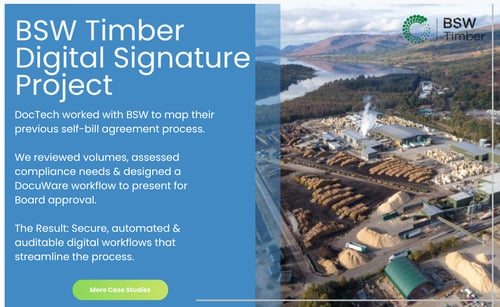 If your organisation relies on emails, spreadsheets or manual approvals to manage documents, there are likely opportunities to improve efficiency.
Common signs that workflow automation could help include:
A process review can help identify where automation will have the biggest impact.
DocTech works with organisations to map existing processes, identify improvements and design workflows that support business objectives.
With decades of experience delivering document management and automation solutions, we help businesses move from manual processes to efficient digital workflows using DocuWare technology.
With a document workflow solution, business processes are digitised and documents are stored in a central cloud-based system. Tasks can be set up to prompt employees when their input is needed on a particular document, such as approving or rejecting an invoice.
Workflows vary from simple approvals to those with added permeations on how a document is approved. These may include multiple approvals for higher values, checking cost centre approvers, substitutions where approvers are out of office and escalations after time lapses.
The whole premise of workflow is to speed up approvals whilst offering total transparency.
Digital document workflows combined with a document management system can be used in various areas of the business to simplify contract management, invoice processing, employee onboarding etc. With our partners at DocuWare and JobRouter we can provide a system to effectively manage documents, data, processes and tasks.

 info@doctech.co.uk
 0161 647 7040