
 Author: Ruban Rajasooriyar
Manual data entry might only take a few minutes at a time, but across hundreds of invoices, orders, forms and other documents, those minutes quickly add up.
Employees can spend hours copying information from documents into spreadsheets, finance software, ERP systems and other business applications. It's repetitive, slows down processes and introduces the risk of human error.
The good news is that much of this work no longer needs to be done manually.
Using document management, intelligent data capture and workflow automation, businesses can automatically extract information from documents and use that data to drive the next stage of a process.
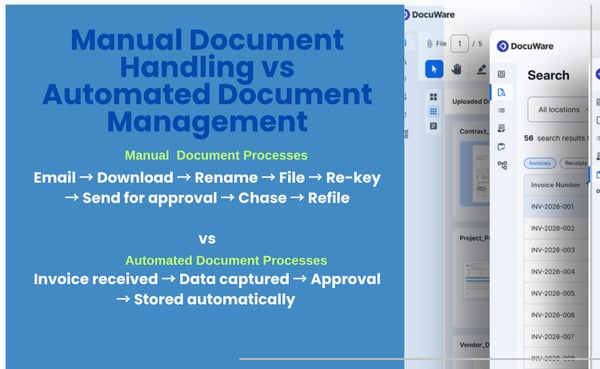 Think about how often employees are copying information from one place to another.
Common examples include:
Individually, these tasks can seem relatively small.
But when they're repeated hundreds or thousands of times each month, they can consume a significant amount of employee time.

Modern document management software can capture documents arriving from different sources, including email, scanners, digital forms and other business systems.
Technology such as Intelligent Document Processing (IDP) can then identify the type of document and extract the information contained within it.
Take a supplier invoice as an example.
Instead of an employee manually typing information into another system, software can capture details such as:
That information can then be used to index the document, start a workflow or populate another business system.
Invoice received → Data captured → Information checked → Approval → Finance/ERP system updated → Document stored
The employee becomes involved when their input is actually required rather than manually handling every step.

Manual data entry doesn't just take time. Every time information is re-keyed, there's an opportunity for something to go wrong.
A mistyped invoice number, incorrect value or wrong reference can create problems later in a process.
Those errors can then take considerably longer to identify and correct than the original data entry took to complete.
Capturing information directly from documents reduces unnecessary re-keying and helps businesses introduce validation earlier in the process.
For finance teams processing large volumes of documents, even small improvements in accuracy can make a significant difference.
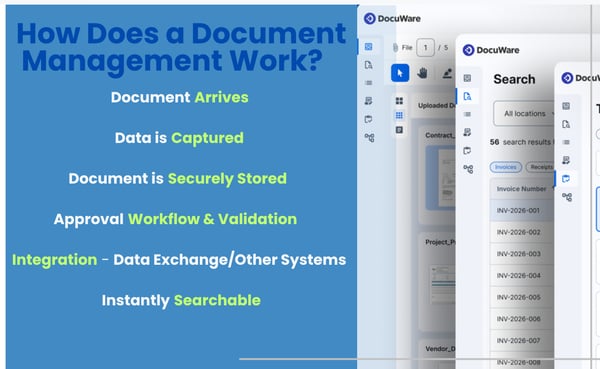 Invoice processing is one of the most common areas where we help organisations reduce manual data entry.
DocuWare can support GL and nominal coding, with processes configured around an organisation's existing requirements.
Information captured from an invoice can be combined with predefined rules and existing business data to help determine how the invoice should be processed.
The invoice can then be routed to the appropriate employee for review or approval without relying on emails, spreadsheets and manual chasing.
Removing manual data entry doesn't necessarily mean replacing your existing business software.
DocuWare can integrate with finance software, ERP systems and other line-of-business applications, allowing documents and data to move between systems.
This can reduce situations where employees receive information in one system and then manually enter exactly the same information somewhere else.
It can also make supporting documents easier to access from the systems employees already use.
For many of our clients, this integration is an important part of their document management project.
Paper documents can also be brought into a digital process.
DocTech can provide document scanning solutions alongside DocuWare, allowing information from existing paper documents to be captured, indexed and securely stored.
For organisations with large archives, we can also help with the digitisation of existing records.
However, reducing manual data entry isn't simply about scanning paper. Increasingly, documents already arrive electronically through email, portals and online forms.
The opportunity is to capture that information at the point it enters the business and avoid unnecessary manual handling afterwards.
.png?width=600&height=369&name=PCB%20quote%20(2).png) A useful starting point is to look at the repetitive document tasks happening across your organisation.
A useful starting point is to look at the repetitive document tasks happening across your organisation.
Consider:
How many documents are processed each week?
How long does somebody spend entering information from each one?
How many people are involved in checking, approving or re-entering the same information?
How much time is spent correcting mistakes or chasing missing information?
A task taking five minutes might not sound significant.
But five minutes across 1,000 documents is more than 83 hours of work.
And that's before considering approvals, filing, searching and correcting errors.
You don't need to know exactly which technology you need or have an automation project already planned.
At DocTech, we can map your current document processes at no cost.
We'll look at where information enters your business, what employees currently have to enter manually, which systems are involved and where repetitive work or bottlenecks occur.
From there, we can identify opportunities for data capture, document management and workflow automation – and recommend a sensible place to start.


 info@doctech.co.uk
 0161 647 7040