
 Author: Laura Bulmer
Think about what happens when an invoice, order, contract or form arrives in your business.
Who receives it? Where is it saved? Does information need to be entered into another system? Who needs to review or approve it? And how does the next person know there's something waiting for them?
All of those steps form a document workflow.
A document management workflow uses software to control and automate how documents and information move through these processes – reducing manual work, emails, delays and the need for employees to chase one another.
A document management workflow is the series of steps a document follows as part of a business process, from the moment it enters or is created within the organisation through to its approval, processing and storage.
Without workflow automation, many of these steps rely on employees.
Someone receives a document, saves it, enters information into another system, emails it to the next person, waits for approval and then files it somewhere else.
Document management software can automate many of these actions.
Instead of relying on somebody to remember what happens next, predefined workflow rules determine where the document goes, who needs to action it and what should happen at each stage.

.png?width=600&height=369&name=What%20is%20a%20DM%20%20(1).png) Take a supplier invoice.
Take a supplier invoice.
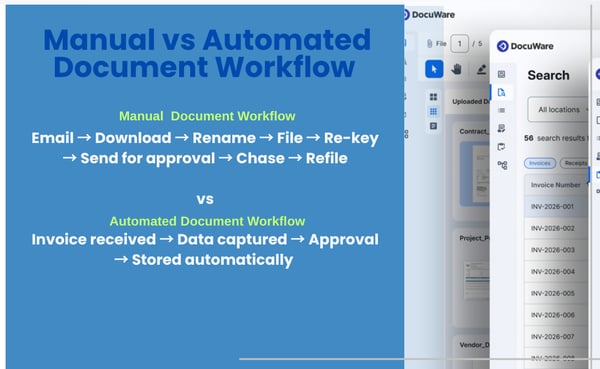
A traditional process might look something like this:
Invoice received → Downloaded → Information manually entered → Emailed for approval → Approval chased → Finance system updated → Invoice filed
With document management and workflow automation, the process could become:
Invoice received → Data captured → Automatically routed for approval → Approved → Finance/ERP updated → Securely stored
Employees still make decisions and provide approvals where they're needed, but much of the administration surrounding those decisions can happen automatically.
 A workflow is configured around the rules and processes of your organisation.
When a document enters the Document Management System (DMS), information about that document can determine what happens next.
For example, an invoice could be routed differently depending on:
A £500 invoice might automatically go to a department manager for approval, while a £20,000 invoice could require additional authorisation.
Once somebody completes their task, the workflow automatically moves to the next stage.
This reduces the reliance on employees manually forwarding documents and remembering who needs to do what next.
Not every document will follow a straightforward route.
That's where workflow rules and exception handling become particularly useful.
For example:
An invoice doesn't match its purchase order
Instead of allowing it to continue through the normal process, the workflow can flag the discrepancy and send it to the appropriate employee for investigation.
An approval is taking too long
If an invoice hasn't been approved within a set period, a reminder can be generated or the task can be escalated to somebody else.
A document is approaching its expiry date
The system can automatically create a task reminding an employee to review or renew it.
Rather than relying on employees to spot these situations manually, the workflow actively manages them.
.png?width=600&height=424&name=generic%20DMS%20(1).png) Document workflows can be used anywhere information needs to pass between people, departments or business systems.
Document workflows can be used anywhere information needs to pass between people, departments or business systems.
Supplier invoices can be captured, checked, coded, routed for approval and stored automatically.
Invoice → Data capture → Validation → Approval → Finance/ERP → Archive
Purchase requests can follow predefined approval routes based on department, value or other business rules.
Request → Manager approval → Purchase order → Supplier → Record stored
Contracts can be routed for review and approval, with reminders created for important renewal or expiry dates.
Contract created → Review → Approval → Signed → Stored → Renewal reminder
Employee forms and records can be securely routed to HR and relevant managers while controlling access to sensitive information.
Form submitted → HR review → Manager action → Employee record updated
Orders can trigger tasks across customer service, production, finance or operations without relying on employees manually informing each department.
Order received → Details captured → Relevant teams notified → Order processed → Record stored
The workflow doesn't have to be complicated. Even automating a few repetitive steps can remove a significant amount of administration.
 Less manual administration
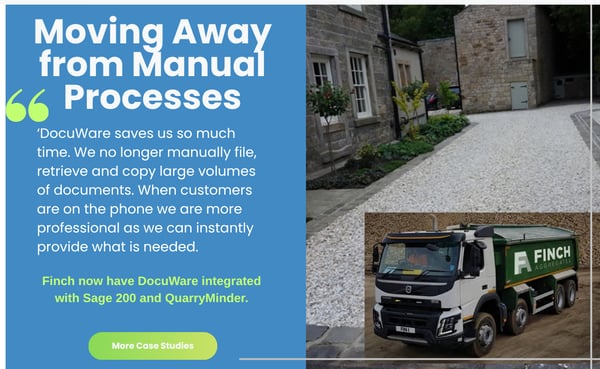
Employees spend less time downloading, renaming, filing, forwarding and re-keying documents.
Documents are automatically sent to the right people and reminders or escalations can prevent tasks from being forgotten.
Employees can see what requires their attention, while managers can see where documents are within a process and identify bottlenecks.
Reducing manual data entry and introducing consistent workflow rules can reduce the opportunity for mistakes.
Documents and the activity surrounding them are managed within a controlled system rather than being spread across inboxes, desktops and paper files.
Instead of relying on individual employees knowing what should happen next, agreed business rules are built into the workflow.

A good starting point is to look for document processes that involve lots of repetitive steps.
Ask:
If several of these sound familiar, there may be an opportunity to simplify the process with document workflow automation.
Workflow automation doesn't need to mean a huge transformation project.
In many organisations, the best approach is to identify one document-heavy process that's creating unnecessary work and start there.
Accounts payable is a common example because invoice processing tends to involve high document volumes, data entry, approvals and integration with finance systems.
But the right starting point could just as easily be HR documents, contracts, customer orders, delivery documentation or another process specific to your organisation.
Once one process is working effectively, document management and workflow automation can be extended into other departments.
Before designing a workflow, we first need to understand how the process works today.
We'll look at:
We can then map the existing process, identify where it could be improved and design a workflow around your actual requirements.
The aim isn't to automate steps simply because we can.
It's to remove unnecessary work while keeping the people, decisions and controls that are important to the process.
You don't need to have your workflows mapped out before speaking to us.
At DocTech, we can map your current document processes at no cost, helping you understand where manual tasks, bottlenecks and opportunities for automation exist.
We'll then suggest which areas could benefit most from document management and workflow automation and recommend a sensible place to start.

 info@doctech.co.uk
 0161 647 7040